



Counterpath Bria
- Bria is a VoIP application for iPhone, iPad and iPod Touch, allowing you to make phone calls over Wifi or 3G. You can download Bria from iTune store or Counterpath. After Bria is installed, follow the steps below for WorldNet VIP settings:
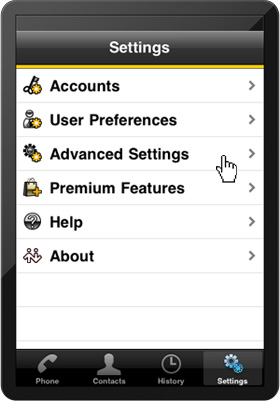
- Start the programe, go to "Settings" and click "Advanced Settings".
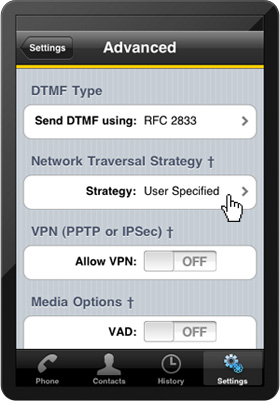
- Under "Advanced Settings" click "Network Traversal Strategy".
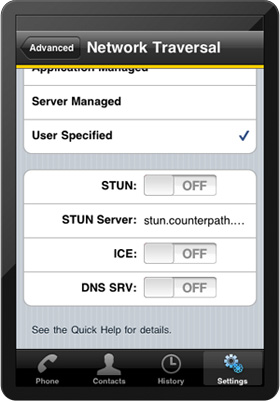
- Scroll down under "Network Traversal", turn off Stun, ICE and DNS SRV.
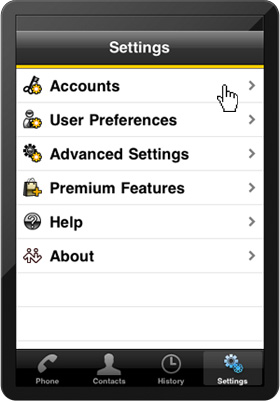
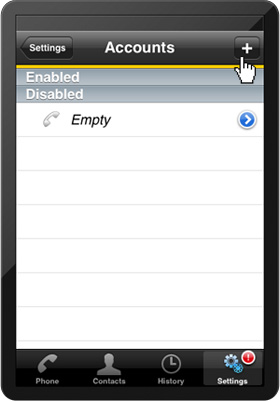
- Go back to "Settings", click "Accounts".
- Under "Accounts", click Add button at the top right corner.
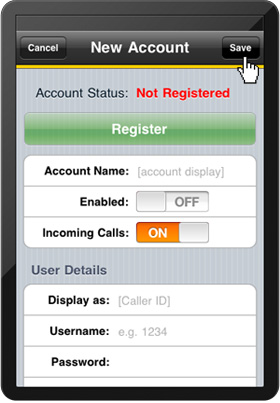
- Under "New Account", enter the following informations:
- Display as: Your VIP number e.g. 09880xxxx
- User Name: Your VIP number e.g. 09880xxxx
- Password: xxxxxxx
- Domain: auckland.worldnet.co.nz
- Enable: ON
- Click "Save" on top right corner.
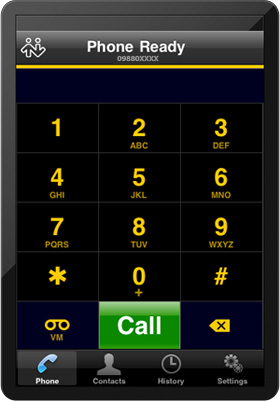
- You are ready to make your first WorldNet VIP call.

WorldNet
608B Rosebank Road, Avondale, New Zealand
Email : help@worldnet.co.nz
Follow Us :




| Auckland | : (09) 880 1001 |
|---|---|
| Hamilton | : (07) 812 1001 |
| Wellington | : (04) 370 1001 |
| Christchurch | : (03) 270 1001 |
| Nationwide | : 0800 89 1001 |
Follow Us :