



Linksys PAP2NA
-
Check Package Contents
- Phone Adapter
- Power Adapter
- User Guide on CD-ROM
- Network Cable Quick Installation - Check IP Address
- Connect Cable - Physical Connection
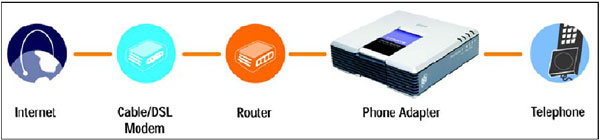
- Basic Structure of Connection, connect the phone adaptor as illustrated.
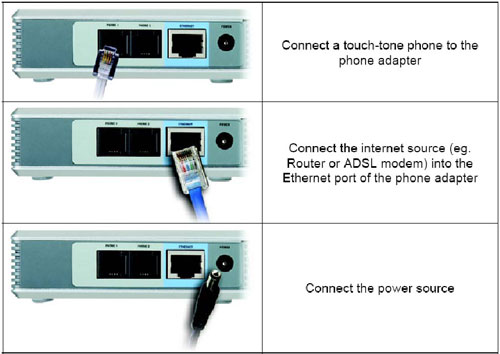
- How to plug in
- Basic Structure of Connection, connect the phone adaptor as illustrated.
- Factory Reset
- Before setting the VoIP adaptor, we must reset the adaptor to Factory Reset.
- Procedure of factory reset
- Plug in a phone to "Phone 1" port of the PAP2
- Dial [****
- You should hear "Configuration Option Menu"
- Dial 73738# (RESET#)
- Press 1 to confirm the reset
- Look for IP Address of the Phone Adaptor
- Pick up the phone and press [****] in the phone.
- Voice announcement about the configuration menu.
- Press [110#]
- IP address will be read out
- Pick up the phone and press [****] in the phone.
- Line1 Configuration, access to Phone Adaptor
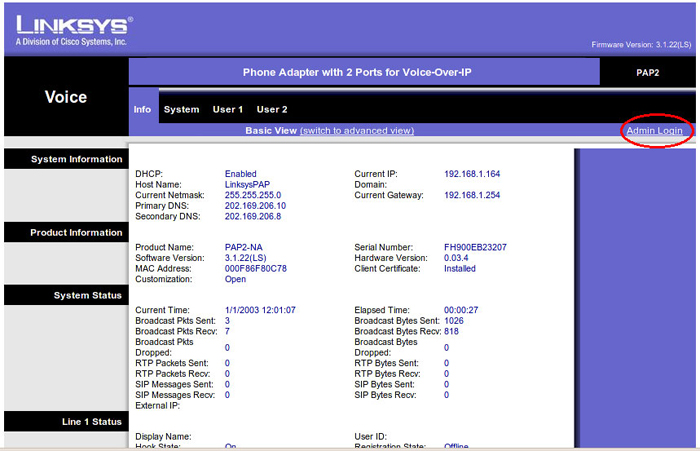
- Type the IP address onto the address bar of internet explorer
- Click "Admin Login" as illustrated
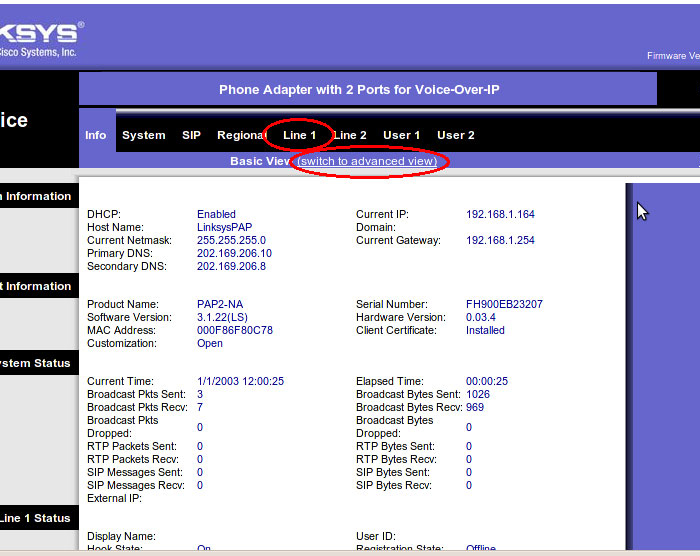
- Click "Line 1"
- Click "Switch to advanced View"
- Line Setting
- Leave default settings except mentioned below
- Line Enable: yes
- NAT settings
- NAT Keep Alive Enable : yes
- Proxy and Registration
- Proxy : auckland.worldnet.co.nz
- Register expires : 600
- Proxy Fallback Intvl : 600
- Subscriber Information
- Display Name : Phone Number
- User ID : [Phone Number]
- Password : [random password] (alphanumeric only, min 8, max 12) - Example
XVI0942VSKDF - Use auth ID : no
- Supplementary Service Subscription
- Block CID Serv: no
- Block ANC Serv: no
- Cfwd All Serv: no
- Cfwd Busy Serv: no
- Cfwd No Ans Serv: no
- Cfwd Sel Serv: no
- Cfwd Last Serv: no
- Block Last Serv: no
- Accept Last Serv: no
- DND Serv: no
- Call Return Serv: no
- Speed Dial Serv: no
- Audio Configuration
- Preferred Codec : G729a
- Fax Passthru Codec : G711a
- FAX Passthru Method: ReINVITE
- Dial Plan
- a) Dial Plan :
(*xx.|111S0|[29]xxxxxxS0|00xx.|02xx.|0[34679]xxxxxxxS0|0508x.|08xx.|09xx.|05xx.|01xx.|11[023456789]xx. - Enable IP Dialing : no
- a) Dial Plan :
- Press "Save Settings" and you can see following message

- Access Regional Configuration
- Click "Regional" in advanced view
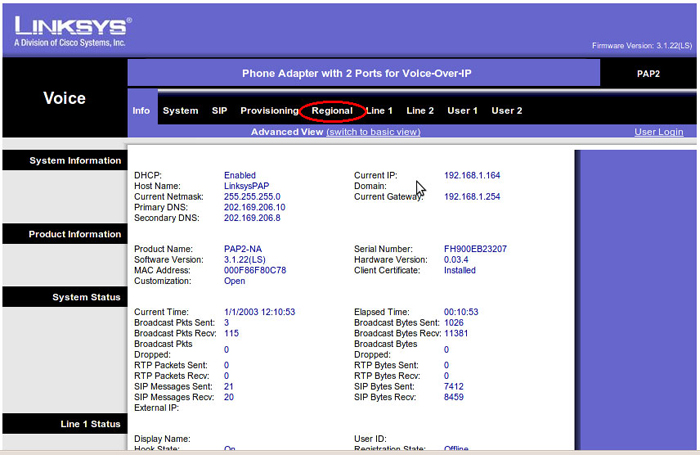
- Click "Regional" in advanced view
- Setting Configuration
- Change regional setting : leave other setting not listed below
- Call Progress Tones
Dial Tone: 400@-9;30(*/0/1) Second Dial Tone: 420@-19,520@-19;10(*/0/1+2) Outside Dial Tone: 420@-16;10(*/0/1) Prompt Tone: 520@-19,620@-19;10(*/0/1+2) Busy Tone: 400@-9;*(.5/.5/1) Reorder Tone: 400@-9;15(.25/.25/1+2) Off Hook Warning Tone: 400@-10,680@0;*(.125/.125/1+2) Ring Back Tone: 400@-19,450@-19;*(.4/.2/1+2,.4/.2/1+2,2/0/0) Confirm Tone: 600@-16;1(.25/.25/1) SIT1 Tone: 985@-16,1428@-16,1777@-16;20(.380/0/1,.380/0/2,.380/0/3,0/4/0) SIT2 Tone: 914@-16,1371@-16,1777@-16;20(.274/0/1,.274/0/2,.380/0/3,0/4/0) SIT3 Tone: 914@-16,1371@-16,1777@-16;20(.380/0/1,.380/0/2,.380/0/3,0/4/0)) SIT4 Tone: 985@-16,1371@-16,1777@-16;20(.380/0/1,.274/0/2,.380/0/3,0/4/0) MWI Dial Tone: 400@-19;2(.1/.1/1);28(*/0/1) Cfwd Dial Tone: 350@-19,440@-19;2(.2/.2/1+2);10(*/0/1+2) Holding Tone: 600@-19;*(.1/.1/1,.1/.1/1,.1/9.5/1) Conference Tone: 350@-19;20(.1/.1/1,.1/9.7/1) Secure Call Indication Tone: 397@-19,507@-19;15(0/2/0,.2/.1/1,.1/2.1/2) - Distinctive Ring Patterns
Ring1 Cadence: 60(.4/.2,.4/2) Ring2 Cadence: 60(.4/.8,.4/14) Ring3 Cadence: 60(.8/.4,.8/4) Ring4 Cadence: 60(.4/.2,.3/.2,.8/4) Ring5 Cadence: 60(.2/.2,.2/.2,.2/.2,1/4) Ring6 Cadence: 60(.2/.4,.2/.4,.2/4) Ring7 Cadence: 60(.4/.2,.4/.2,.4/4) Ring8 Cadence: 60(0.25/9.75) - Distinctive Call Waiting Tone Patterns
CWT1 Cadence: 30(.3/9.7) CWT2 Cadence: 30(.1/.1, .1/9.7) CWT3 Cadence: 30(.1/.1, .3/.1, .1/9.3) CWT4 Cadence: 30(.1/.1,.1/.1,.1/9.5) CWT5 Cadence: 30(.3/.1,.1/.1,.3/9.1) CWT6 Cadence: 30(.1/.1,.3/.2,.3/9.1) CWT7 Cadence: 30(.3/.1,.3/.1,.1/9.1)) CWT8 Cadence: 2.3(.3/2) - Ring and Call Waiting Tone Spec
Ring Waveform Sinusoid Ring Frequency 25 Ring Voltage 70 CWT Frequency 400@-10 Synchronized Ring No - Miscellaneous
Set Local Date (mm/dd): Set current month and day Set Local Time (HH/mm): Set current hour and minute Time Zone GMT+12 FXS Port Impedance 220+8200 - - 120nF Daylight Saving Time Rule start=10/1/7/2;3/15/7/3;save=1 FXS Port Input Gain -4 FXS Port Output Gain - 10 DTMF Playback Level 0 DTMF Playback Length .1 Detect ABCD No Playback ABCD Yes Caller ID Method Bellcore(N.Amer,China) FXS Port Power Limit 4
- Press "Save settings".
- Line 2 Configuration
- Follow same procedure to line 1.(with port number 2)
- SIP
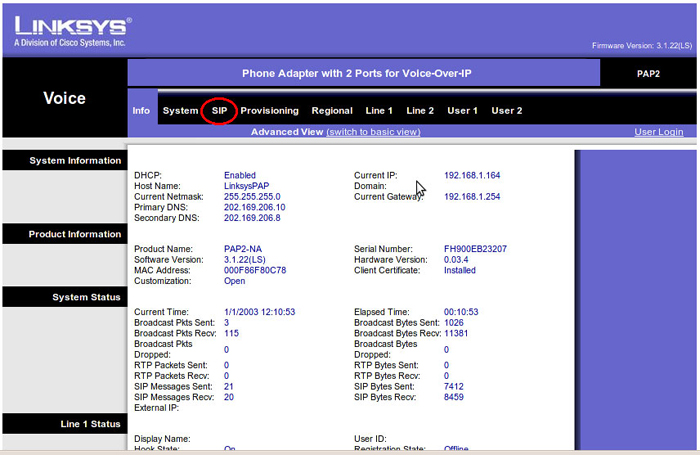
- Click "SIP"
- AT Support Parameters
- NAT Keep Alive Intvl: 60
- NAT Keep Alive Intvl: 60
- Click "Save Settings" and you can see following message
- Click "SIP"

WorldNet
608B Rosebank Road, Avondale, New Zealand
Email : help@worldnet.co.nz
Follow Us :




| Auckland | : (09) 880 1001 |
|---|---|
| Hamilton | : (07) 812 1001 |
| Wellington | : (04) 370 1001 |
| Christchurch | : (03) 270 1001 |
| Nationwide | : 0800 89 1001 |
Follow Us :