



Free softphone X-Lite
- Download X-Lite Softphone from here and install
- Right click on the screen and select "SIP Account Settings..."
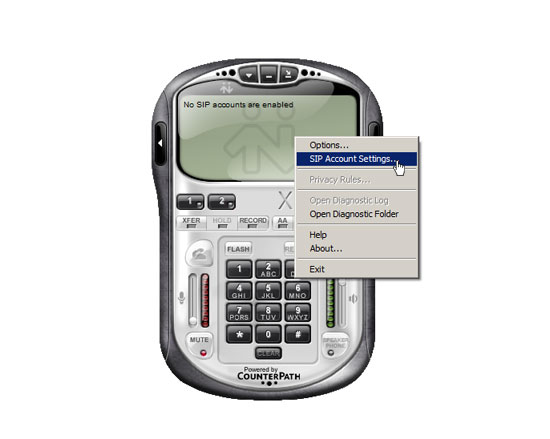
- Click "Add" button and enter your account details.
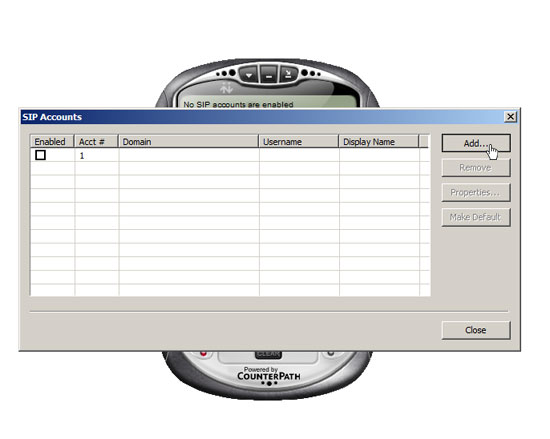
- Display Name: Your VIP number e.g. 09880xxx
- User Name: Your VIP number e.g. 09880xxxx
- Password: xxxxxxx
- Authorization username: Your VIP number e.g. 09880xxx
- Domain: auckland.worldnet.co.nz
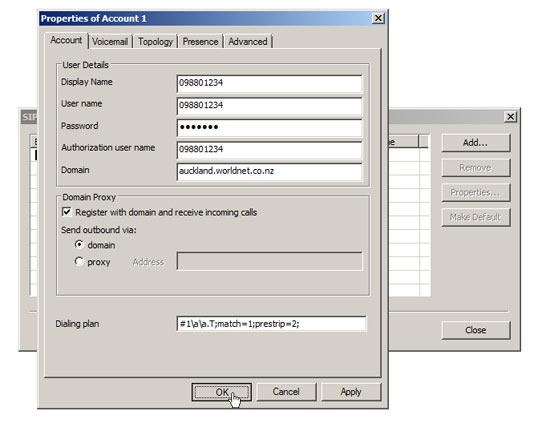
- Tick "Register with domain and receive incoming calls" and select domain under Domain Proxy.
- Click "OK" button and then click "Close".
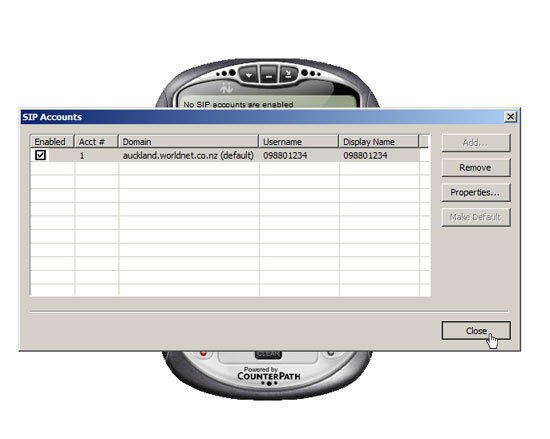
- Click "Allow access" if "Windows Security Alert" window pops up.
- Enter the number you wish to call and then click the green dial button. To hang-up, click the red hang-up button.

WorldNet
608B Rosebank Road, Avondale, New Zealand
Email : help@worldnet.co.nz
Follow Us :




| Auckland | : (09) 880 1001 |
|---|---|
| Hamilton | : (07) 812 1001 |
| Wellington | : (04) 370 1001 |
| Christchurch | : (03) 270 1001 |
| Nationwide | : 0800 89 1001 |
Follow Us :